

I usually judge a calendar app by what happens on an ordinary, slightly chaotic day rather than by how impressive its feature list sounds. A useful calendar should help me notice what is coming, capture commitments before they disappear from my mind, and turn a vague plan into a routine I can actually maintain. That is the angle I used with 2026 Calendar Launcher, a free productivity app from AtomApplications.
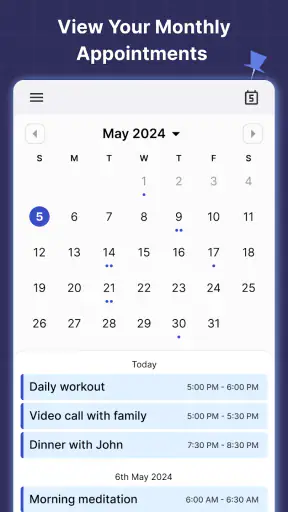
The app is built around a simple idea: keep the calendar close to the place where I begin using my phone. Its store summary presents it as a daily calendar launcher with reminders, event planning, and appointment scheduling, while the short description reduces the concept to “2026 Calendar.” That combination tells me who it is aimed at: people who want a practical date-and-schedule tool without committing to a large, complicated planning system.
It has reached over a million installs and holds a 4.4 average from around ten thousand ratings, which suggests that the straightforward approach works for many users. It is free, rated for Everyone, and the current version is 2.17.0. I also appreciate that its minimum requirement is Android 10, so it is not limited to only the newest phones.
How I fit it into a calmer daily workflow
Start with the problem before opening the calendar
The most useful way to approach this app is not to treat it as a place where every thought must be stored. Before entering anything, I first separate three kinds of information: things that happen at a fixed time, tasks that need attention but have some flexibility, and details I merely want to remember. A calendar is strongest with the first group. If I put every small task into it, the day quickly becomes a crowded list that I stop trusting.
For a normal weekday, I might begin by checking appointments, school or work commitments, and anything that affects when I need to leave home. That gives the calendar a clear job: show me the shape of the day. I then add only the reminders that support those fixed commitments. This prevents the common mistake of turning a calendar into an overstuffed to-do list.
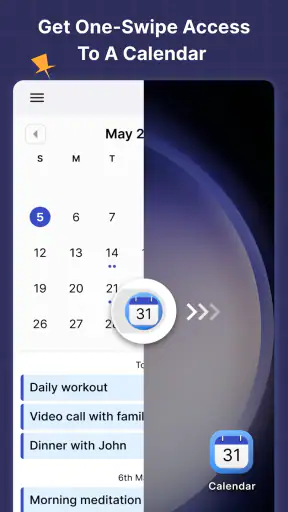
The launcher-oriented design is particularly helpful for people who repeatedly forget to check their schedule. Instead of relying on a separate habit, the calendar can become part of the phone-opening routine. I found that this matters more than decorative customization. A calendar that I see at the right moment is more useful than a sophisticated one that I rarely open.
There is also a practical distinction between planning and reacting. I prefer to look at the next day before finishing the current one, rather than waiting for a reminder to surprise me. That small review lets me notice clashes, prepare documents, and adjust travel time. The app works best when I use it as a daily checkpoint, not as an emergency box for forgotten obligations.
Capturing events without creating future confusion
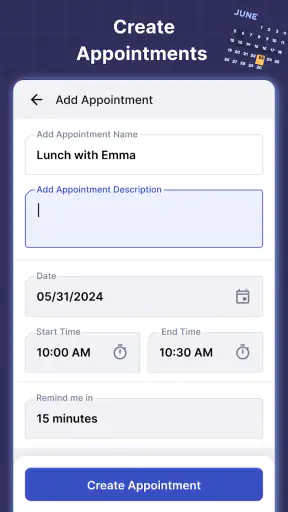
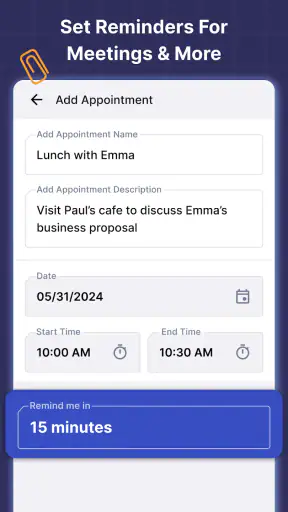
When I add an event, I try to write the title so that it answers the first question I will have later: “What exactly is this?” A label such as “appointment” is less useful than a clear description of the purpose. I also include the person, place, or preparation detail that would otherwise force me to search through messages.
This is one of the less obvious strengths of a simple calendar workflow. The value is not only in recording a time. It is in reducing the number of small decisions I need to make when the reminder appears. If I have to reconstruct the context from memory, the notification has done only half its job.
I recommend entering commitments as soon as they are agreed, even if they are still several days away. Waiting until the evening often creates duplicate entries or forgotten details. For recurring responsibilities, I would first decide whether they genuinely repeat. A weekly event that frequently changes is better entered individually; otherwise, an old repetition can remain in the schedule and quietly mislead me.
Another useful habit is to give related events a consistent naming pattern. For example, I might begin with the type of commitment and then add the specific purpose. This makes a busy view easier to scan and helps me distinguish a routine appointment from a one-off deadline. The app does not need to make that decision for me; a little discipline in how I type is what keeps the calendar readable.
Turning reminders into a repeatable routine
Reminders are most effective when they are connected to an action. A notification that says only “meeting” may be enough for someone who is already ready, but it is not enough if I need to gather notes, charge a device, or leave the house. I use the event title or its surrounding details to remind myself what preparation is required.
For an everyday example, imagine that I have an afternoon appointment after work. I would record the appointment when it is booked, then review the following day’s schedule before bed. In the morning, I check the calendar while deciding when to leave. If preparation is needed, I handle it before the reminder becomes urgent. The calendar is not doing all the work; it is acting as the reliable trigger in a wider routine.
I also prefer a short evening review over constant checking. Looking at the whole next day helps me notice whether the schedule is realistic. If every hour is occupied, I can identify the transition that is likely to fail. A calendar cannot create extra time, but it can expose an overloaded plan early enough to change it.
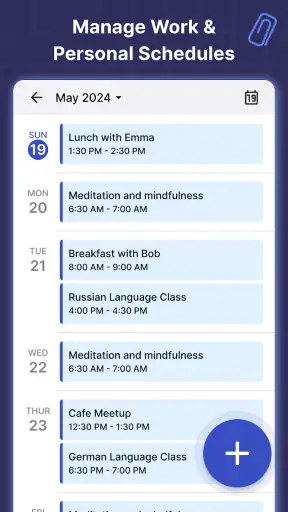
For people who work across personal and professional commitments, the key is to keep the view meaningful. I would avoid adding minor errands simply because there is space. Instead, I use the calendar for events that affect availability, timing, or preparation. Smaller tasks can remain in a separate note or task system if that is already working well.
This approach also makes the app easier to maintain. A sustainable productivity system should not require a long administration session every day. If entering an event takes more effort than the event deserves, I am likely to postpone it. Clear titles, consistent habits, and a quick daily review reduce that friction.
Where it fits beside familiar calendar alternatives
Compared with a standard calendar already integrated into a phone, 2026 Calendar Launcher appeals to me when quick visibility is more important than building a large ecosystem. Someone who wants a focused schedule check may prefer its direct, calendar-first feel over an app surrounded by email, contacts, documents, and collaboration tools.
On the other hand, users who coordinate with teams, depend on shared calendars, or need deep integration with several services may be better served by the calendar that already belongs to their work or communication platform. A launcher cannot replace collaboration features that are central to a professional workflow. The right choice depends on whether the calendar is mainly personal or part of a group system.
It also differs from a task manager in an important way. A task manager asks what needs doing; a calendar asks when something occupies time. I would not use this app as my only planning tool if my day contains many flexible projects, because placing every task at a precise time can create a false sense of control. I prefer to reserve the calendar for commitments and use another method for the work around them.
Its free price removes an obvious barrier for someone who wants to try this approach. That does not automatically make it the best option for everyone. People who need advanced collaboration, detailed project planning, or a highly specialized scheduling environment should compare it with tools designed for those needs rather than expecting a lightweight calendar launcher to cover everything.
Small habits that prevent the calendar from failing
The first failure point is stale information. A cancelled appointment that remains visible is worse than no entry because it can cause me to plan around something that no longer exists. I make a habit of editing or removing changes as soon as I learn about them. This keeps the calendar trustworthy.
The second is unrealistic timing. If I enter events back-to-back without considering travel, preparation, or recovery, the schedule may look tidy while being impossible to follow. I treat the visible gaps as useful space rather than empty space. Even when the app records the events correctly, my planning can still fail if I ignore the time between them.
The third is notification fatigue. Reminders should protect important commitments, not interrupt me for every minor intention. I am selective about what deserves an alert. If everything is urgent, nothing feels urgent, and I start dismissing notifications automatically.
A fourth issue is relying on memory for details that should be written down. I may remember that I have an appointment but forget what I need to bring. A short, specific note attached to the event is often more valuable than adding several extra reminders. This is a simple workflow improvement that makes the app feel much more capable in daily use.
There is also a human limitation: a launcher can encourage checking, but it cannot make me act on what I see. If I repeatedly dismiss reminders without changing my behavior, the problem is no longer the calendar view. I need to reduce commitments, move preparation earlier, or create a clearer routine around the alert.
Who will benefit most from adopting it
I think this app is a good match for someone who wants a visible personal schedule, frequently forgets appointments, or finds full-featured planning platforms distracting. It can also suit a student, freelancer, parent, or shift-based worker who mainly needs to keep dates and appointments in front of them without building a complicated project system.
It is especially useful for people who are willing to spend a few minutes establishing consistent entry habits. The app becomes more valuable when event names are clear, commitments are recorded immediately, and the next day is reviewed at a predictable time. Those practices are simple, but they turn a basic calendar into a dependable external memory.
I would be more cautious about recommending it as the only planning tool for a team. If several people need to edit schedules together, assign work, or follow project progress, a collaborative platform is likely a better foundation. Likewise, anyone who wants a detailed task database may feel constrained if they try to force every task into a date-and-time structure.
Privacy-conscious users should make their own comfort decision before placing sensitive information into any digital calendar. I keep event descriptions useful but restrained, especially when a full name or private detail is not necessary for me to remember the commitment. That is good calendar practice regardless of which app I use.
The age rating of Everyone makes it approachable for a broad audience, and the Android 10 minimum keeps it usable on many still-common devices. AtomApplications has continued developing it through the current release, and the version number indicates an actively maintained product rather than a forgotten one. I would still check that the app fits my phone’s normal calendar habits before moving all important scheduling into it.
My overall judgement after using the workflow
What I like most about 2026 Calendar Launcher is its clear role. It does not need to become my entire productivity system. It works better as the dependable front door to my schedule: a place I can check quickly, update when plans change, and use to anchor a realistic daily routine.
The free model makes experimenting easy, and the strong user response gives it credibility without removing the need for personal testing. My 4.4 average impression is positive because the app focuses on a common problem: remembering when life requires my attention. Its usefulness depends less on elaborate planning theory and more on whether I keep the information current.
The best result comes from using the calendar as a commitment filter, not a storage bin for every intention. I would install it if I wanted a straightforward Android calendar that encourages regular checking and keeps appointments close at hand. I would skip it in favor of a more integrated alternative if shared scheduling, team coordination, or complex task management were central to my day.
For the right user, the app offers a practical starting point for a sustainable system: capture commitments immediately, review tomorrow before today ends, prepare before the reminder becomes urgent, and leave enough space for real life. That is not a flashy promise, but it is exactly the kind of routine that can make a simple productivity app genuinely useful.


